More cartons. A clear view.
Build supported layouts for up to 2,500 identical boxes, with a 3D view and compact loading instructions.
General mixed-cargo calculation: up to 500 units. Up to 500 cargo rows per project.From packing list to loading day
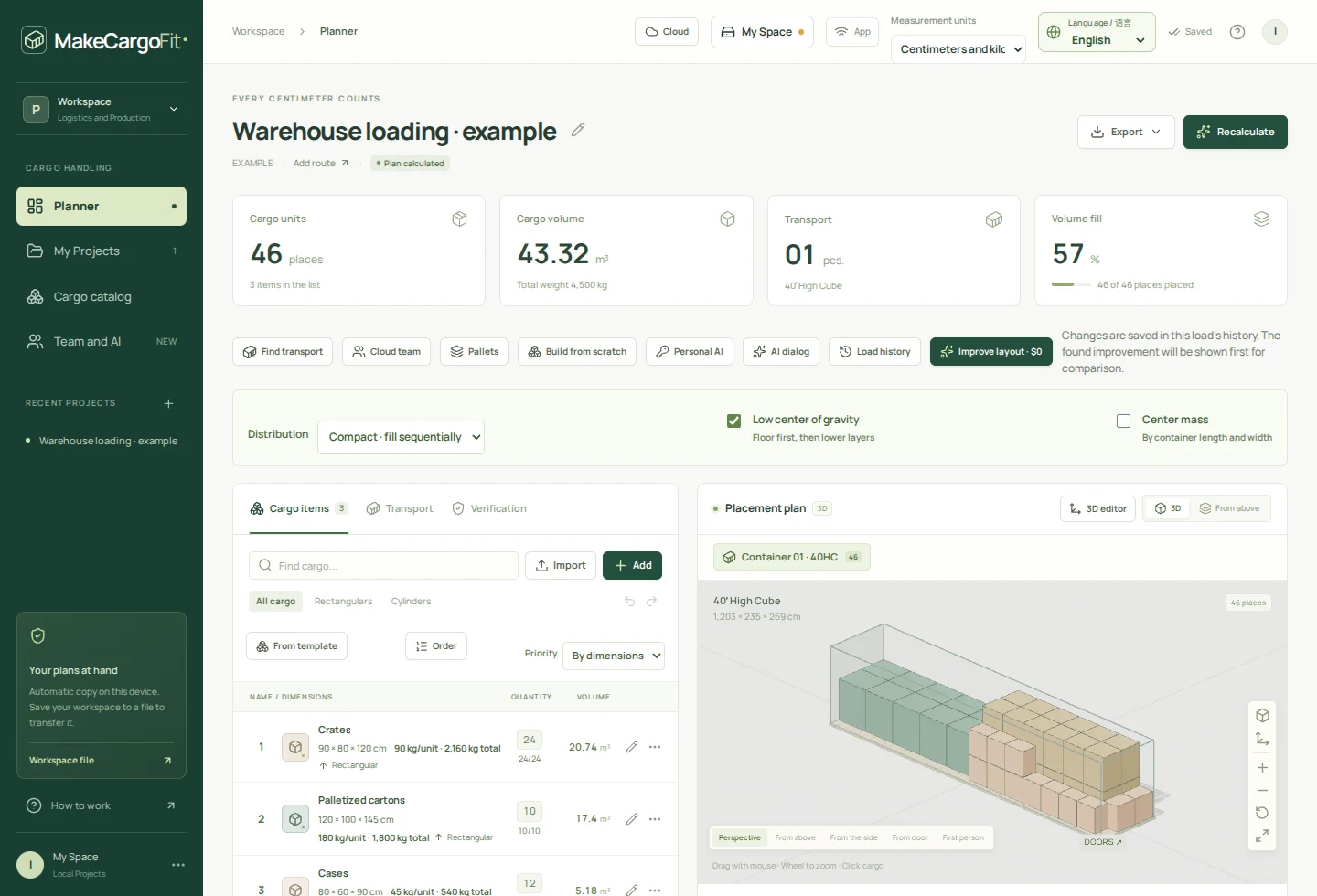
Import your packing list. Build and adjust the load in 3D. Give your warehouse a plan they can understand—in their language, on paper or on a tablet.
Local planning will be free. No account or card needed.

Illustrative plan · always check before loading
Product preview
We are preparing the complete MakeCargoFit planner for this website. Explore the tools, preview the workflow and read the guides while we finish connecting the application.
Accounts, protected warehouse links and cloud subscriptions are not open here yet.
More of the loading day, covered
Build supported layouts for up to 2,500 identical boxes, with a 3D view and compact loading instructions.
General mixed-cargo calculation: up to 500 units. Up to 500 cargo rows per project.Enter dimensions and weights in centimeters and kilograms or inches and pounds. Keep the same choice on screen and in PDFs.
cm / kg ↔ in / lb · input, display and exportChoose among 16 profiles, including custom dimensions. Compare supported vehicle options by the calculated layout or your own rates.
Typical profiles · always check the actual vehicleInspect the cargo’s center of gravity and axle warnings using the weights and vehicle geometry you provide. Unknown data stays visible.
Reference checks support your review; they do not approve the physical load.Choose from nine interface and document languages. Select the instruction language independently, with an optional second language.
EN · RU · ES · 中文 · DE · PL · UK · RO · LTMove and rotate cargo, build item by item or look inside in first-person view. Prepare the PWA for local work without internet.
Manual 3D · first-person view · offline calculation and PDFFrom the planner to the loading team
Prepare clear PDF instructions for the loading team. Protected read-only 3D links for warehouse tablets are coming with cloud sharing.
Cloud sharing · coming soonPDF instructions belong to the free local planner. Online warehouse links will need an account and internet access; they are not open on this website yet.
One load. One shared understanding.
A practical workflow for shippers, freight forwarders and the people doing the loading.
Import CSV or Excel, or enter cargo by hand. Use centimeters and kilograms or inches and pounds.
Choose your transport, calculate a layout and adjust each item in 3D. Check what fits—and what still needs a place.
Prepare PDF loading steps in your crew’s language. Protected 3D links for warehouse tablets are planned with free cloud accounts.
Local first. Yours to keep.
Save projects, your cargo catalog and history in one portable file. Open it on another device or keep a password-encrypted backup.
For the work around the plan
We are developing the next layer around the plan: cloud teamwork, warehouse execution and connections to your existing tools. These services are not open for public access or purchase yet.
Keep the exact revision everyone agreed on and make warehouse progress visible to your organization.
Connect planning to the tools your team uses. Public integrations and ready-made ERP/TMS adapters will be introduced separately.
Cloud services will open separately. Local Free planning, ordinary PDFs and safety warnings will remain part of the free planner.
Start with the free planner
Local planning will stay free within the documented calculation limits. Free accounts are planned to include three active warehouse links. Cloud plans and prices below are a preview: registration, sharing and checkout are not open on this website yet.
0
for local planning
Free local planning, with portable files and PDF instructions. The planner is being prepared for this website.
€19.00
per month
€190.00
per year
$19.00
per month
$190.00
per year
For one planner, with free viewers.
Editor seats: 1 · up to 3 viewers
€18.00
per month · per editor
€180.00
per year · per editor
$18.00
per month · per editor
$180.00
per year · per editor
For logistics teams, with free viewers.
2–100 editors · up to 100 viewers
from €290.00
per month · per site
Annual price to be confirmed
from $299.00
per month · per site
Annual price to be confirmed
For warehouse sites. Purchasing remains closed pending commercial approval.
5 editors included per site
Preview prices exclude VAT. Checkout is not open. Included AI budget is planned monthly, including with annual billing.
Yes. Local calculation, manual 3D editing, CSV/Excel import, ordinary PDFs and portable files are free. No account or card is needed for local planning.
Plan boxes, supported upright cylindrical cargo and pallets. Start with a transport profile or enter actual internal dimensions, door clearance and payload. Special shapes and unrestricted side or top loading are not modeled.
Yes. Choose cm/kg or in/lb for input, display and PDFs. The interface and documents support nine languages, and the instruction language can differ from the interface language.
Local projects hold up to 2,500 units across up to 500 cargo rows. Automatic layouts above 500 units use the supported identical-box path; the general mixed-cargo solver remains limited to 500 units.
PDF instructions can be handed over directly. Protected read-only 3D warehouse links are planned, including three active links per free account. This website does not open cloud sharing yet.
Yes, after installing the app and preparing offline access. Local calculation, editing, CSV/Excel import and PDF export work offline. AI, online links and cloud services need internet access.
No. Packing calculations work without AI. Optional personal AI connects directly to OpenRouter using your own key and provider balance; provider charges apply.
Cloud accounts are being prepared with optional authenticator-based verification. Account registration is not open on this website yet; the guides describe setup and recovery.
No. Check actual dimensions, weights, packaging, axle limits and securing. The planner’s geometric layouts and reference checks do not certify transport safety, dangerous-goods compatibility or compliance.
MakeCargoFit
Start with your cargo list. Leave with a plan your team can use.